Export Apple Health from your iPhone. Keep it on your Mac.
Your Apple Health history in one database on your Mac.
- Every record, workout and sleep night
- Charts for steps, running, strength and sleep
- Scheduled CSV, JSON and REST exports
- Ask your own AI over MCP
- No account, no subscription, no server of ours
- Open source, MIT
- No tracking cookies
- No ads
The iPhone exports. The Mac charts what it stores.
Use the iPhone app on its own, or pair it with a Mac and keep the history in one place.
iPhone appFree
- Reads Apple Health, never writes to it
- Saves 7 days, 30 days, 12 months or all history as JSON or CSV
- Sends new data to your own REST API, no Mac needed
- Sends new data to your Mac over your own network
Mac app$15 $10 once
- One SQLite database for records, workouts, sleep, ECGs, State of Mind, medications and Activity rings
- A dashboard, plus pages for steps, running and strength training
- Scheduled exports to cloud folders, email, REST, MQTT and Home Assistant
- A built-in MCP server for your AI assistant
- Workout routes (GPS maps) aren't kept yet
Health Auto Export works while its iPhone app is open. Health to Mac works from your Mac.
Both have a Mac app, dashboards and an MCP server. Here's the rest, row by row.
- HAE pricing
- GitHub
- healthyapps.dev
- Sync to Mac docs
- Automations docs
- MCP announcement
- App Store listing
- Supported data
Health Auto Export details come from its own documentation, App Store listing and GitHub, checked on 3 November 2026. US prices. If something here is out of date, tell us and we'll fix it.
Workout routes (GPS maps) aren't kept yet. The database stores a route's GPX file name, not the map.
Pages built for how you train
Every page charts the data stored on your Mac.
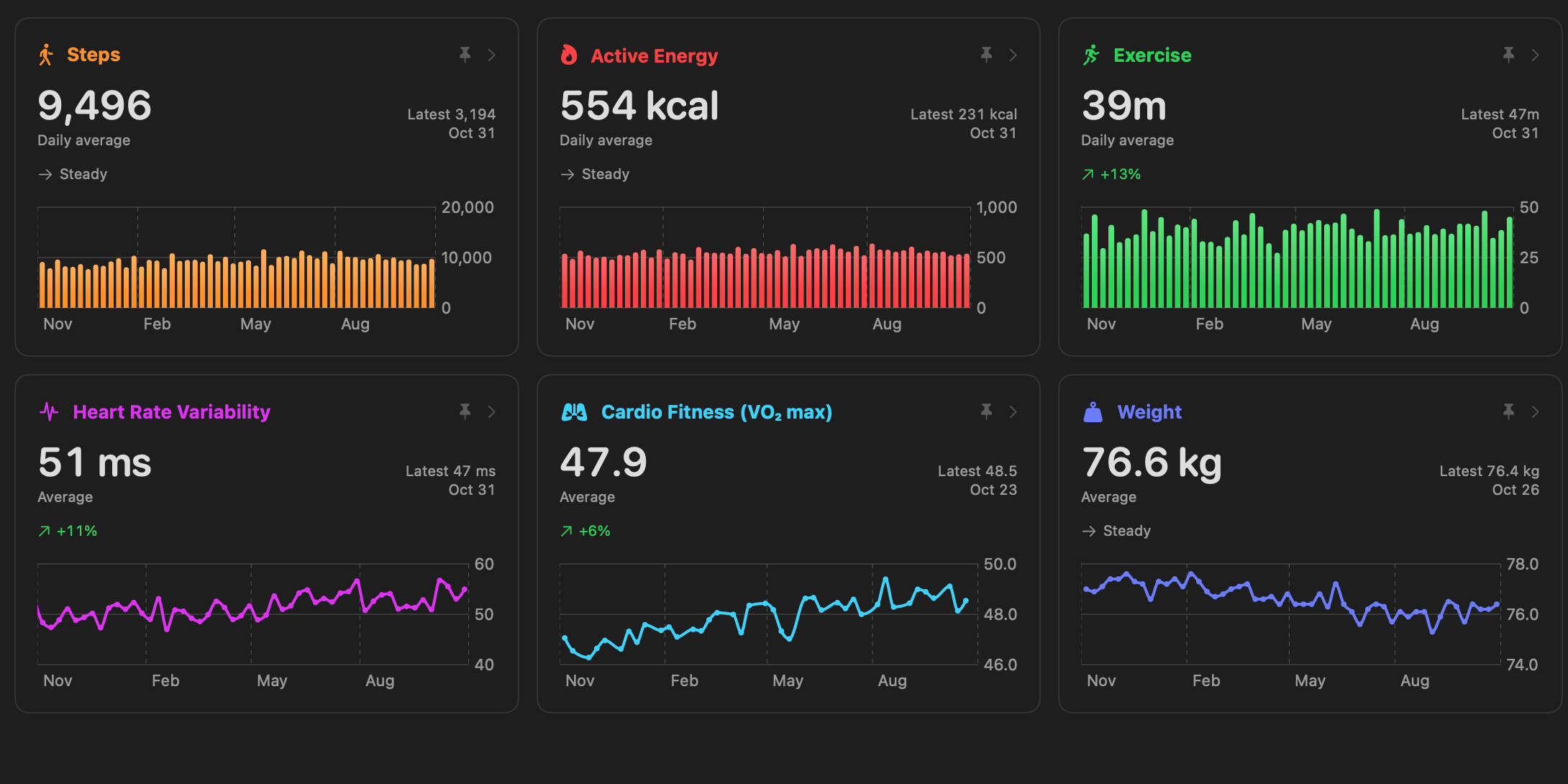
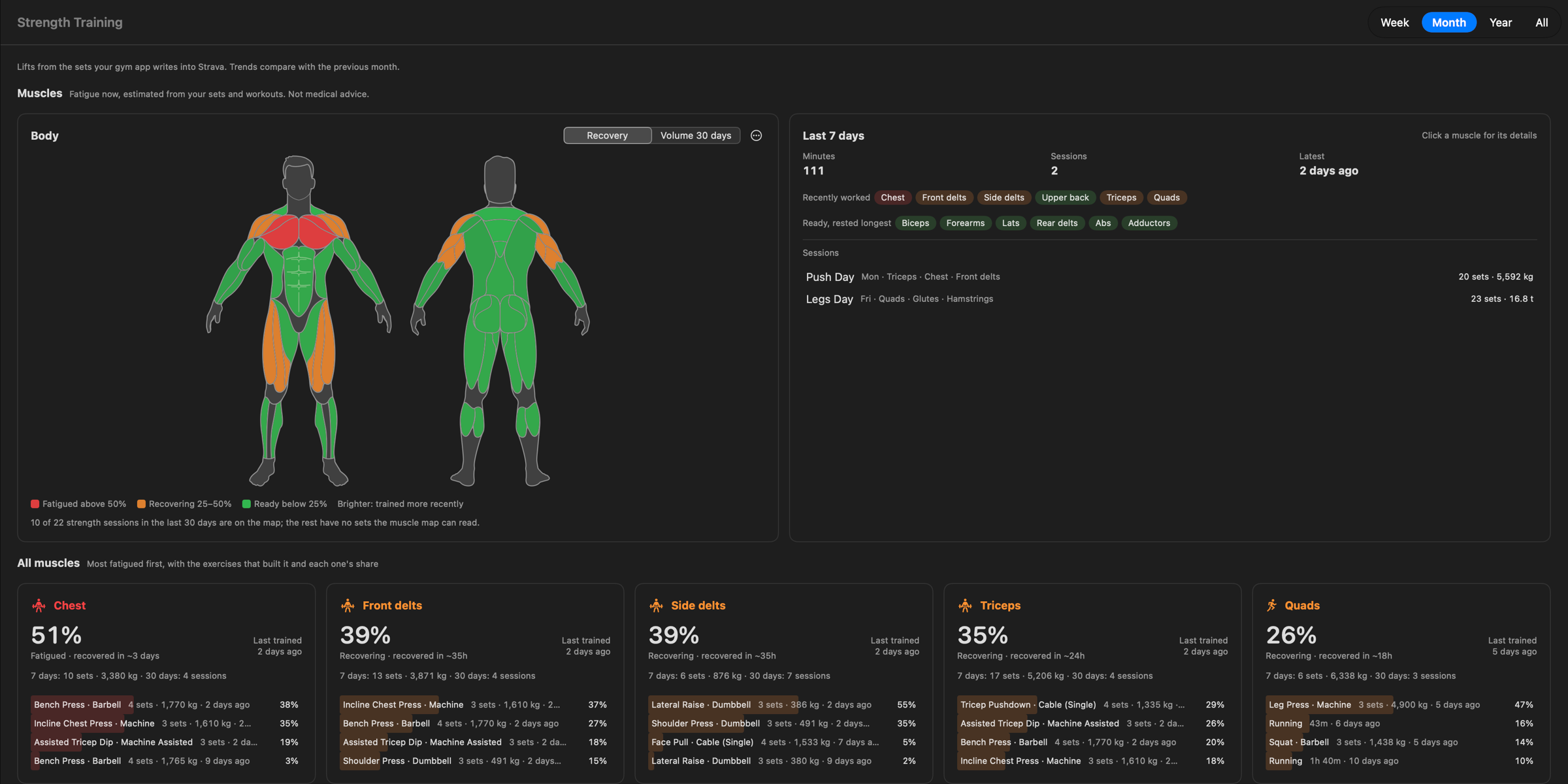
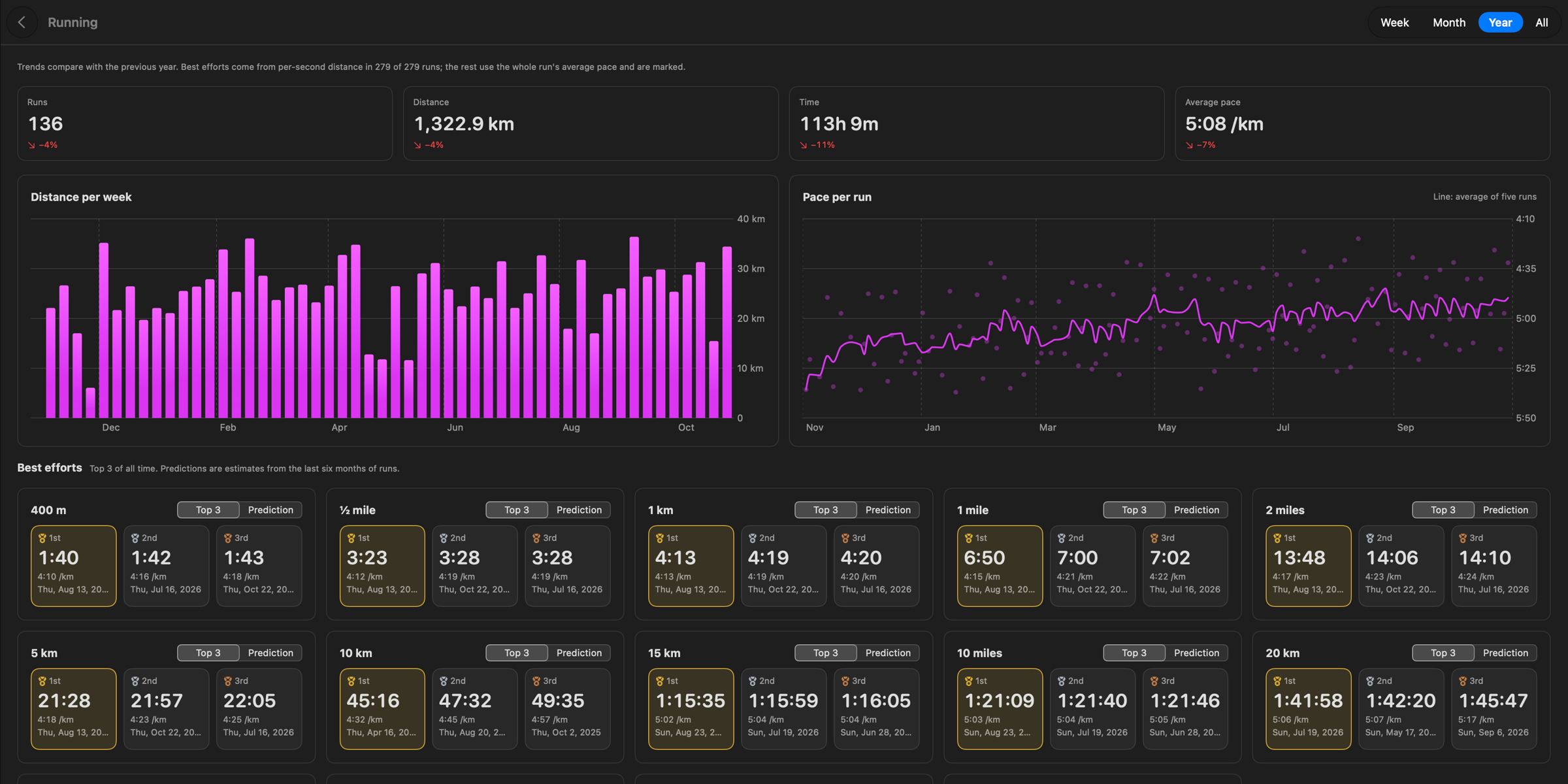
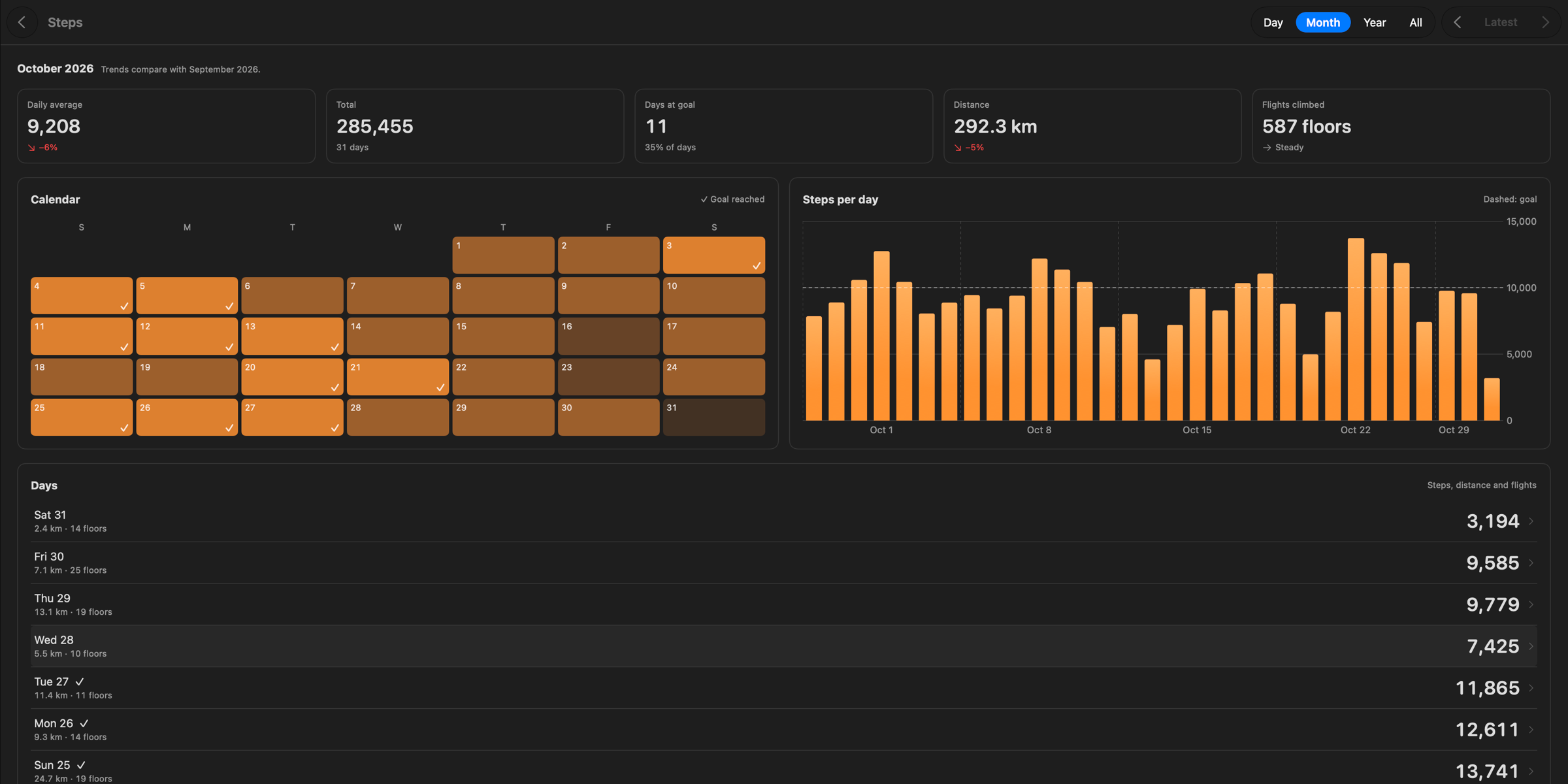
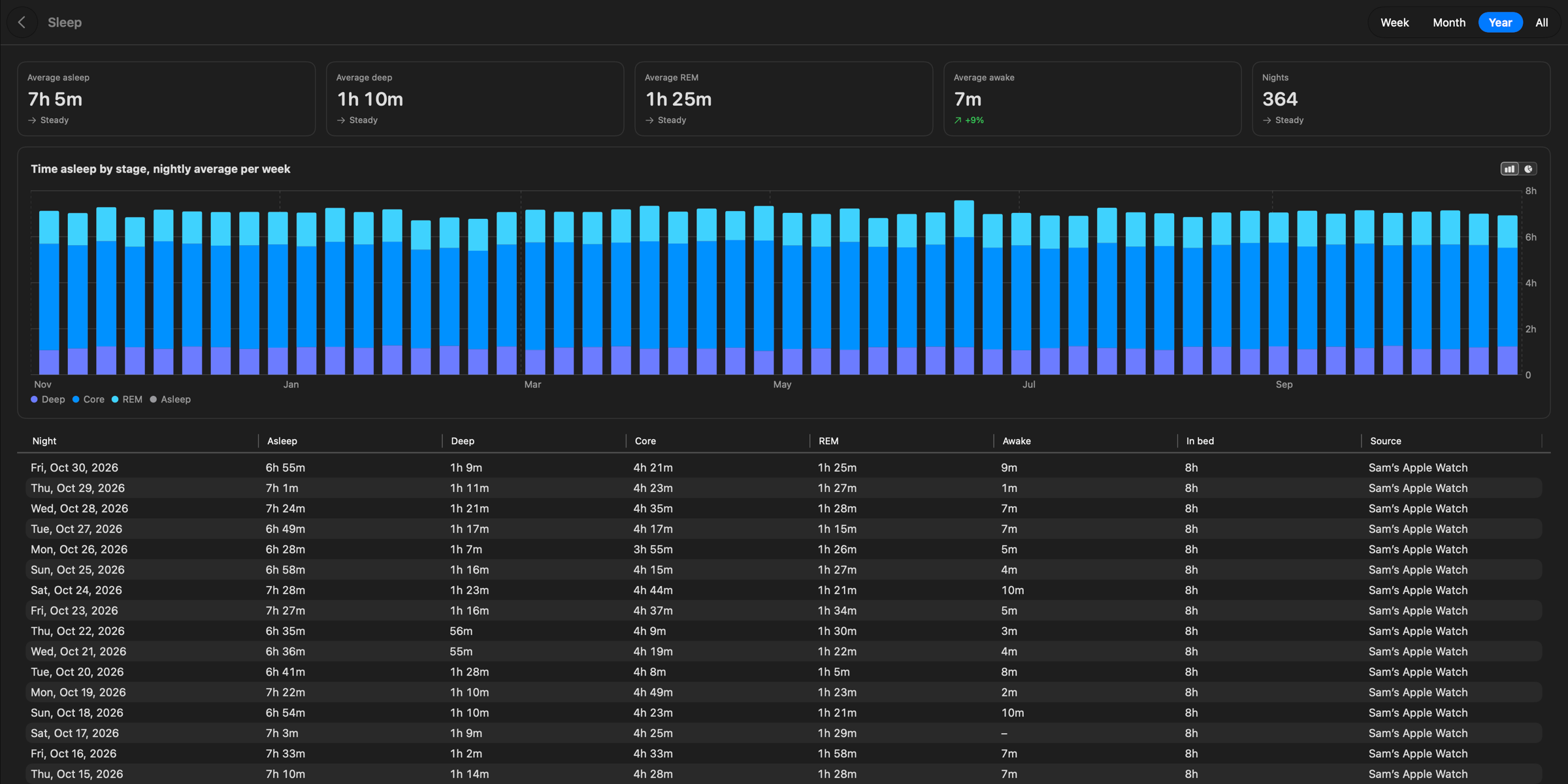
Screenshots of the Mac app with made-up data. Coming next: food tracking and more connections, as free updates.
How it works
Two ways in, one database. Use either, or both.
- 1
Import your history
Export All Health Data on your iPhone, then drop the archive on Health to Mac.
- 2
Pair the iPhone app
Turn on Live Bridge on the Mac and scan its pairing code.
- 3
New data follows
When Health has new data, iOS wakes the iPhone app to send only what changed.
Bring your own AI
Health to Mac has no model of its own. It ships a read-only MCP server, so the assistant you already use can answer questions from your Mac's database.
Exports that run by themselves
The iPhone app saves files and sends to REST for free. The Mac app sends everywhere below on a schedule, included in the one-time price.
- Files
- One JSON document, or one CSV file per section, into any folder, including iCloud Drive, Dropbox and Google Drive.
- The export as attachments, zipped when large, through iCloud Mail, Gmail, Fastmail, Outlook.com or any SMTP server.
- REST
- JSON POST requests with a bearer token or your own headers, sent in batches and retried after network errors.
- MQTT
- One message per record to any broker, with TLS and QoS 0 or 1.
- Home Assistant
- Sensors for steps today, active energy, exercise, distance, resting heart rate, HRV, weight, last night's sleep and the time of the latest health data. They appear automatically through MQTT Discovery.
On the Mac, choose the data types, daily values or raw samples, and a date range. Exports run when new data arrives, every few hours, or daily at a set time, while the app is open or from cron or launchd. Each destination remembers where it left off and sends only what's new. Passwords and tokens stay in the macOS Keychain.
Your data stays on your devices
We never see your health data. No server of ours receives it. Neither app has an account, ads or analytics.
- Health data leaves the iPhone only for your paired Mac, a file you save, or a REST URL you enter.
- The Mac app sends data only where you tell it: Strava, your exports, your AI assistant.
- The Mac app's update check shows our web host your IP address and app version. No health data.
- This website sets no tracking cookies and has no ad trackers. Page-view counting is off. When it is on, Cloudflare Web Analytics counts page views. The count is aggregated and sets no cookie. Google Search Console shows how the site appears in Google Search, using Google's own search results. It sets no cookie here. Neither service receives health data.
- It's open source, so you can check this in the code.
- Read the privacy policy
Early-bird price
$15 $10, once
The signed, notarized Mac app. Every feature is included, and it updates itself. Paid once, for life. The iPhone app is free.
$10 one time, plus tax where applicable. Checkout by Polar, with Apple Pay. Free if you build it yourself on GitHub. The iPhone app is free.
Included
- Dashboard, Workouts, Steps, Running and Strength Training
- ECG, State of Mind and medications
- MCP server for your own AI
- Scheduled exports to files, email, REST, MQTT and Home Assistant
- The
healthtomaccommand-line tool - Free updates for life
Coming
- Food tracking
- More connections
Questions
Does the iPhone app need to stay open?
No. When Health has new data, iOS wakes the iPhone app in the background (about once an hour at most for each kind of data) and it sends only what changed, to your Mac and to your REST export if you set one up. iOS decides exactly when. The Mac's exports and AI access use the data already in its database, so they never wait for the phone.
Do I need a Mac?
No. The iPhone app is free and exports by itself: save the last week, month, year or all of it as JSON or CSV to Files, or have new data sent to your own REST API after every sync. The Mac app adds the database, the pages, scheduled exports to more places, and AI access.
Does it sync while my iPhone is locked?
No. iOS doesn't let any app read Health data while the iPhone is locked, so syncing resumes after you unlock it. That applies to every Health app, this one included.
Can I use it without the iPhone app?
Yes. In Health on the iPhone, tap your profile picture and choose Export All Health Data, then AirDrop the export.zip to your Mac and drop it on Health to Mac.app. Repeat it whenever you like: records already in the database are skipped. Workout routes (GPS maps) aren't kept yet. The import stores the GPX file's name, not the map.
Is the connection between iPhone and Mac encrypted?
The phone talks to the Mac over HTTP, because a Tailscale address can't get a certificate a phone will trust. The health data is sealed. You pair by scanning a code on the Mac, and the phone and the Mac each derive a key from that exchange. The key stays in the iPhone's Keychain and is not itself sent over the network. Someone on the same Wi-Fi can see that the two are talking, and the size and timing, but not the data. Use it on your home network or over Tailscale.
What does the AI assistant see?
Health to Mac has no AI model of its own. Its MCP server lets an assistant you choose read your database; it can't change or delete anything. Whatever the assistant reads goes to that assistant's model provider, under their privacy terms.
Do I need Strava?
Only for the Strength Training page, which reads your sets from Strava activities. Everything else, Running included, comes from Apple Health. The connection uses a Strava API application you create yourself, so Health to Mac has no server in the middle.
Can I get it for free?
The paid download is the signed, notarized Mac app: $10 early-bird, $15 later, paid once. Every feature is included, and it updates itself. The iPhone app is free. The Mac app is free if you build it yourself from the MIT source on GitHub.
Is there a subscription?
No. $10 once (early-bird price, regular $15), and updates stay free for life. The iPhone app is free, exports included.
An Apple Health app for your Mac
An Apple Health app for Mac
Apple Health lives on your iPhone. Health to Mac puts a copy of your Health data on your Mac, in one database you can browse, chart and export. The iPhone app sends new data as it arrives.
Read the guideA Health Auto Export alternative
Health to Mac does a similar job from a different place. Its exports and AI access run from your Mac, so they don't wait for the iPhone app to be open. The Mac app costs $10 once, the iPhone app is free, and the code is open source. Health Auto Export can send cloud and email exports with no Mac; Health to Mac can't.
Read the guideExport Apple Health data to CSV or JSON
The free iPhone app saves the last 7 days, 30 days, 12 months or all history as JSON or CSV in Files. The Mac app exports on a schedule to folders, email, REST, MQTT and Home Assistant.
Read the guideOpen your Apple Health export.zip on a Mac
In Health on the iPhone, choose Export All Health Data. AirDrop the export.zip to your Mac and drop it on Health to Mac.app. Import a newer export later and records already stored are skipped.
Read the guideQuery Apple Health with SQL or AI
Your data is a plain SQLite file at ~/Library/Application Support/Health to Mac/health.sqlite. Query it with any SQLite tool or the healthtomac command-line tool. Or let Claude, Cursor or another MCP client read it through the built-in server.
Read the guide